Install runtime for Managed Stacks
Managed Stacks is deprecated. Install and configure the runtime only if you still use Managed Stacks. The default product installation does not require it.
The default installation of Cloud Solution Workbench is the design-time workbench (Solution Designer). Runtime components — k5-projects, pipelines, GitOps, and deployment targets — are needed only when you enable Managed Stacks to build and deploy generated services.
Complete the core installation first, then follow this page.
Topology overview
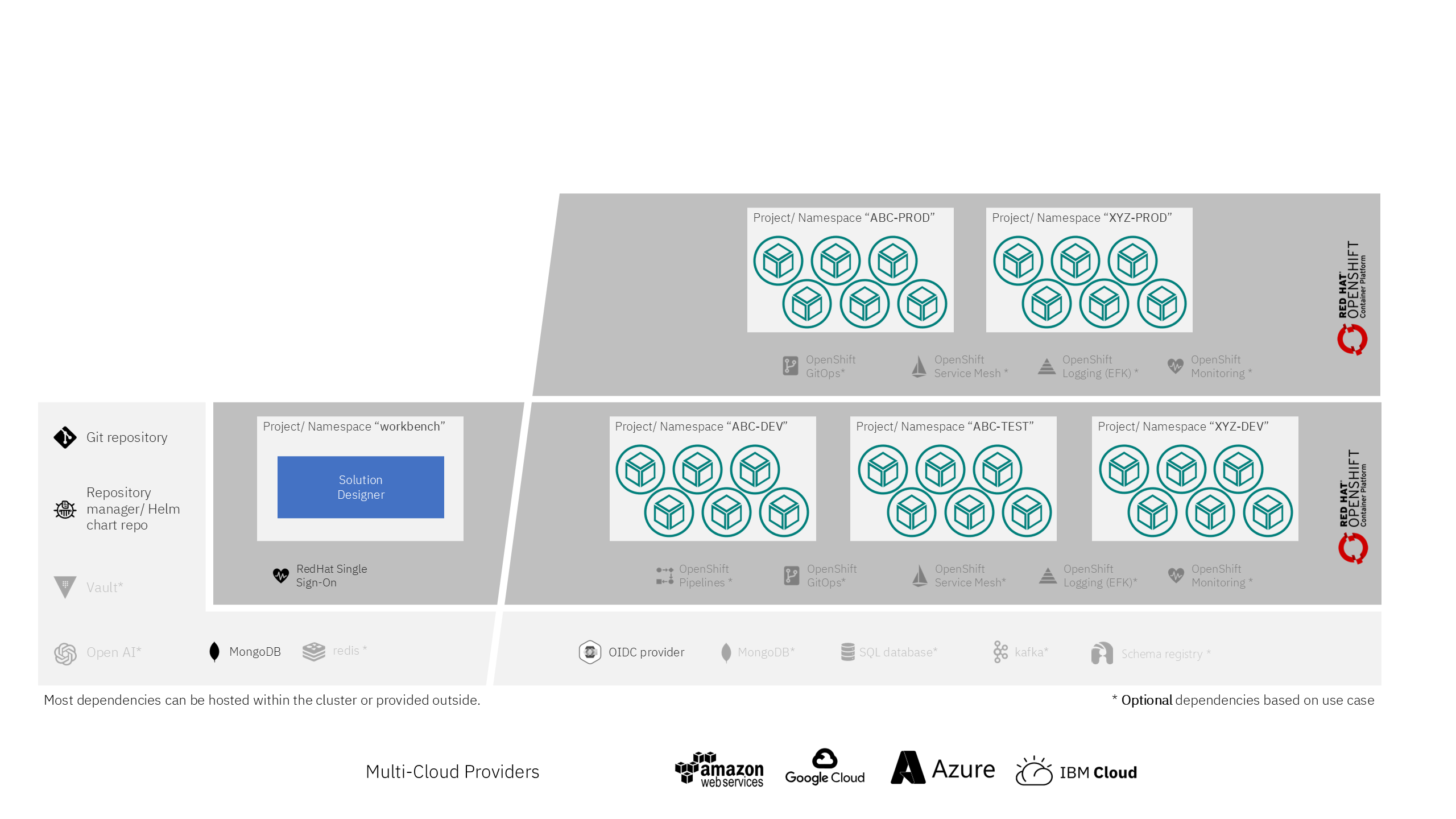
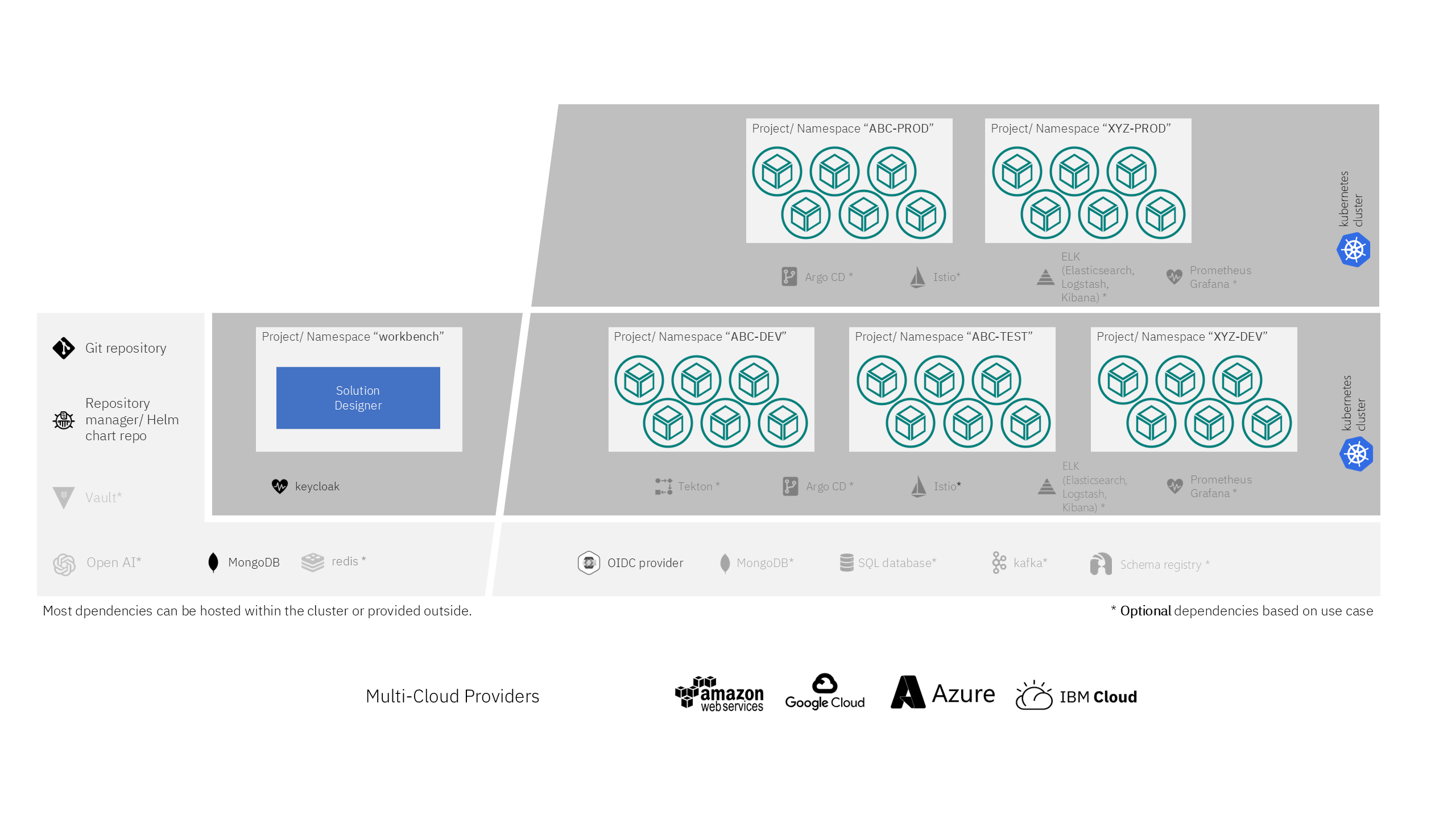
The following pictures show an example Managed Stacks setup. In this example a dual-cluster topology is assumed: one cluster for development and testing, one dedicated cluster for production workloads.
OpenShift
Kubernetes
What the runtime adds
When runtime is enabled, the Helm chart deploys additional components used to build, deploy, and operate Managed Stacks services, including:
- k5-project operator and Custom Resource Definitions
- pipeline manager (Tekton resources)
- configuration management
- application manager, topic management, and related operators
You also need extra cluster capacity, third-party services, and one or more k5-project namespaces as deployment targets.
Helm parameters
Set these values when you install or upgrade the Helm chart. Managed Stacks need both the feature flag and the runtime components.
| Parameter | Description | Required for Managed Stacks | Default |
|---|---|---|---|
global.k5.featureFlags.enableHeritageStacks | Enable Managed Stacks (Deprecated). | yes | false |
global.k5.runtime.enabled | Enable runtime components (operators, CRDs, pipeline manager, configuration management). Required when Managed Stacks is enabled. | yes | true |
k5-pipeline-manager.tekton.initialize | Create Tekton pipeline resources. Set to true only if OpenShift Pipelines / Tekton is already installed. | true | |
runtime.aggregateRoles.create | Create aggregation roles needed for runtime. | true | |
runtime.crds.create | Create Custom Resource Definitions needed for runtime. | true | |
runtime.scc.create | Create Security Context Constraints needed for runtime (Tekton pipeline steps). | true | |
global.k5.openshiftConsole | URL of the OpenShift Console, used for links to Tekton PipelineRuns. | - |
Example Helm parameters:
HELM_OPTIONS="${HELM_OPTIONS} \
  --set global.k5.featureFlags.enableHeritageStacks=true \
  --set global.k5.runtime.enabled=true"
If you do not use Managed Stacks, keep global.k5.featureFlags.enableHeritageStacks=false. You can also set global.k5.runtime.enabled=false so runtime operators, CRDs, and pipeline resources are not deployed.
The chart default for global.k5.runtime.enabled is true. For a design-time-only installation, set it to false explicitly.
Namespaces
In addition to the installation namespace used for the workbench, Managed Stacks need one or more runtime namespaces:
| Namespace | Description |
|---|---|
| cloud-solution-workbench | The installation namespace from the core installation. |
| k5-projects | OpenShift projects / Kubernetes namespaces used as deployment targets. In Solution Designer they are called deployment targets (used to deploy and run microservices). On the Environment page they appear as k5-projects; elsewhere they may be referred to as Envoys. You can define one or more deployment targets. |
The project administrator prepares these namespaces and installs Envoys (k5-projects) in them. See Create deployment targets.
System requirements for runtime
Hardware
The table below outlines the minimum requirements for deploying a single service project (2 pods). Scale this by the number of service projects and stages you expect. Requirements vary by technology stack and load.
| Hardware | CPU | Memory |
|---|---|---|
| x86-64 | 200m | 1.5Gi |
Third-party components
These components are optional for the core workbench and required or recommended when you use Managed Stacks to build, deploy, and run services.
Red Hat OpenShift
| Component | Required version | Optional for core install | Needed for Managed Stacks |
|---|---|---|---|
| Red Hat - Streams for Apache Kafka | Version 3.2 | yes | Eventing |
| Red Hat build of Apicurio Registry | Version 3.3.1 | yes | Event schemas |
| Red Hat OpenShift GitOps | Version 1.21 | yes | Application composition |
| Red Hat OpenShift Pipelines | Version 1.23 | yes | Build and deploy |
| Red Hat OpenShift Logging Operator | Version 6.4 | yes | Operations logging |
| MongoDB | Version 7 | yes | Business data of deployed services |
Kubernetes
| Component | Required version | Optional for core install | Needed for Managed Stacks |
|---|---|---|---|
| Apache Kafka | Version 4.3 | yes | Eventing |
| Apicurio Registry | Version 3.3.1 | yes | Event schemas |
| ArgoCD | Version 3.4 | yes | Application composition |
| Tekton | Version 1.12 | yes | Build and deploy |
| MongoDB | Version 7 | yes | Business data of deployed services |
OpenShift Service Mesh or Istio is optional for both topologies.
Helm chart repositories
A Helm chart repository is required to release your service projects' Helm charts in order to create components. It must meet the following requirements:
- The chart repository must not be helm-oci based
- The chart repository must contain an
index.yamlfile, see Helm Chart Repository. - The chart repository must be available from the cluster via
HTTPSand has a proper certificate (not self-signed)
Examples for supported Helm Chart Repositories are:
- ChartMuseum Repository Server
- GitLab Package Registry
- Sonatype Nexus Helm Chart Repository - limited support!
Using Sonatype Nexus as Helm chart repository doesn't support descriptions and icons used in Solution Designer to display components.
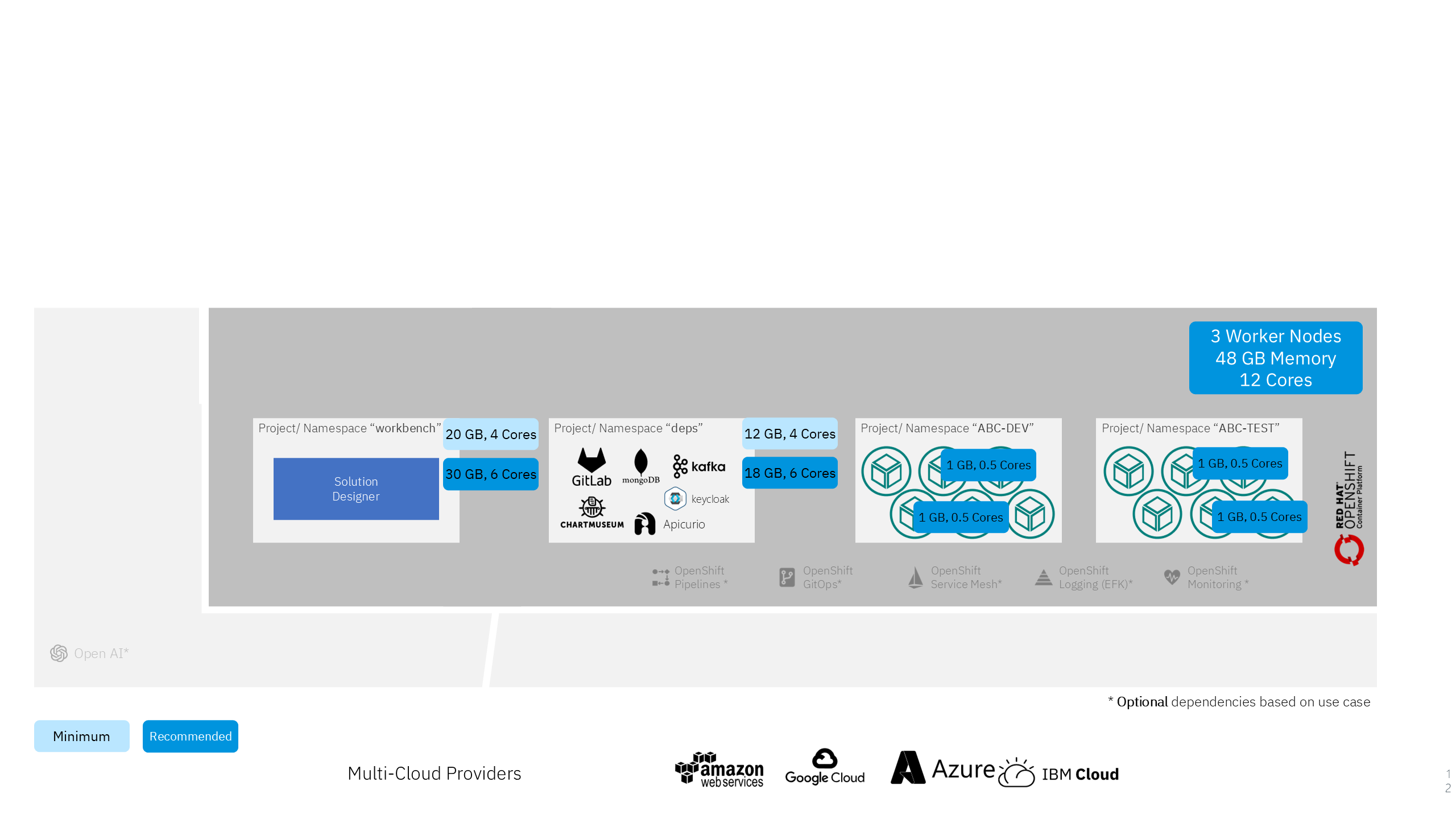
Quick sizing for PoC
The diagram below is general advice for a possible PoC sizing when Managed Stacks is used, including deployment-target namespaces and typical third-party components.
After the Helm install
- Configure network policies for the workbench namespace and for deployed services.
- Create one or more deployment targets (k5-projects).
- Optional: connect ArgoCD, Schema Registry, Vault, and audit logging as described in optional configuration. Those bindings are used by Managed Stacks runtimes.
For air-gapped clusters, every runtime namespace (k5-project) also needs access to your identity provider, repo.maven.apache.org (Java solutions), and registry.npmjs.org (Node solutions). See Airgapped configuration.